Wait… the football star is sitting in the audience?! ⚽️
Kling 3.0 Turbo AI 影片生成器:快速將文字與圖像轉為影片
Kling 3.0 Turbo AI 影片生成器可將提示詞或首幀圖像快速轉換為電影感 3–15 秒影片。支援 720p/1080p 彈性輸出、多鏡頭場景,並可匯出為直式、方形或橫式格式。
影片歷史紀錄
Kling 3.0 Turbo AI 影片生成器介紹
探索 Kling 3.0 Turbo AI 影片生成器,這是一款快速的 Kling 影片模型,支援文字轉影片、首幀圖像轉影片和多鏡頭短影片創作。
Kling 3.0 Turbo 是一套用於短電影感片段的快速 Kling 影片創作工作流程。它支援文字轉影片和圖像轉影片生成、720p 和 1080p 輸出、16:9、9:16 和 1:1 長寬比、3 到 15 秒影片長度,以及最多六個鏡頭的結構化多鏡頭場景規劃,帶來更精細的場景控制。
Kling 3.0 Turbo AI 影片生成器範例
探索 Kling 3.0 Turbo 提示詞範例,適用於真實動作、產品展示、直式社群影片、多鏡頭場景規劃、電影感鏡頭指導和首幀圖像動畫。
原始圖片
影片
提示詞
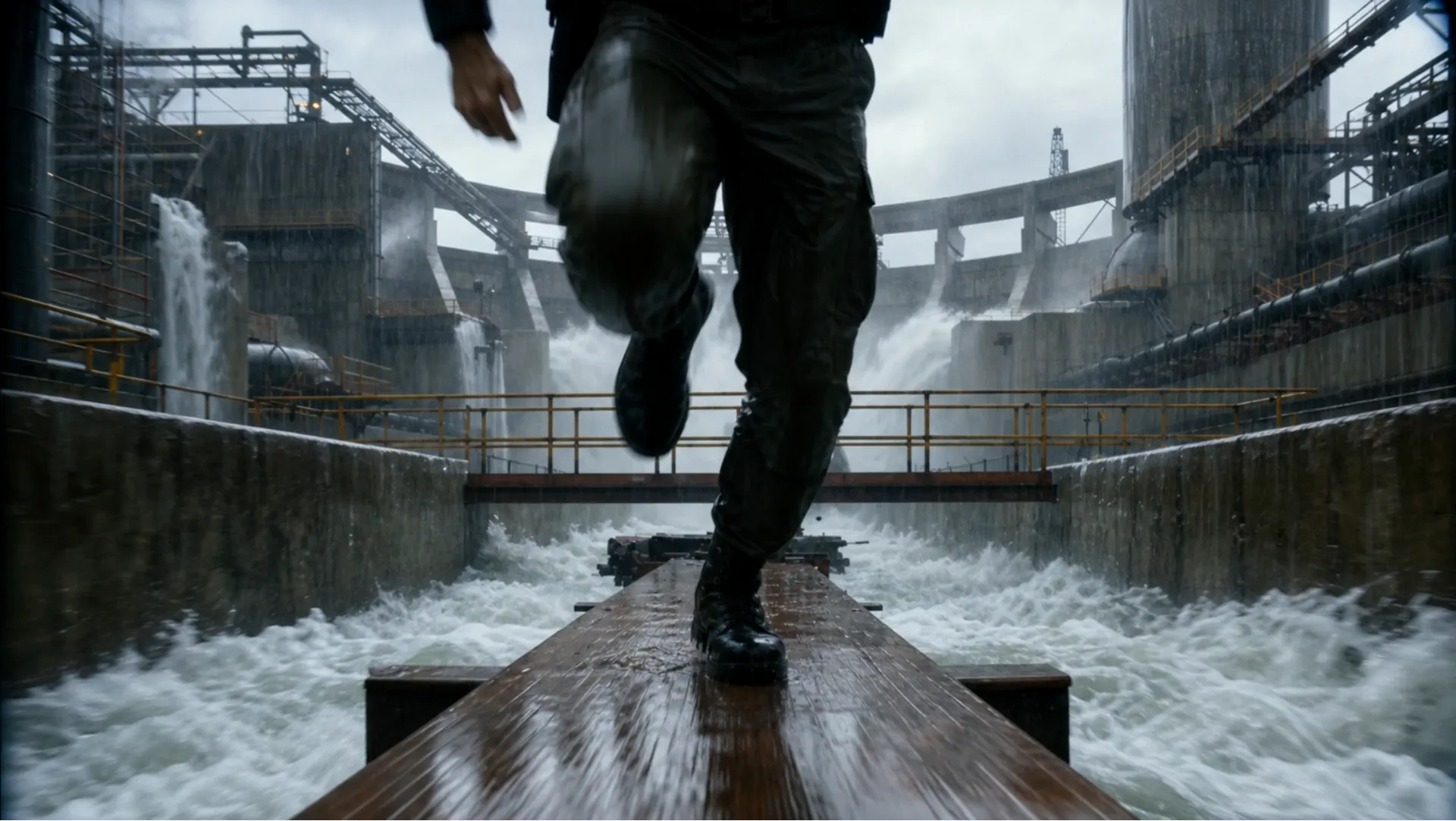
Ultra-realistic 16:9 cinematic creature-feature chase, 4K HDR, 35mm anamorphic, bright stormy daylight, heavy rain, rushing mist, wet concrete, practical giant-crocodile realism, aggressive handheld chase camera, low-angle tracking, whip pans, crash zooms, motion blur, speed ramps, bullet-time payoff. Scene: a massive flooded jungle water-treatment plant deep in rainforest: concrete channels, rusted catwalks, roaring spillways, floodgates, pumping stations, tropical storm chaos. 0-3s Hook: Begin mid-chase. A soaked jungle ranger in tactical gear sprints in panic across a narrow elevated walkway above a raging channel. Behind him, a gigantic crocodile explodes through a metal safety barrier; twisted rails fly into floodwater. The crocodile charges, throwing spray everywhere. Camera races backward in front of the ranger as he leaps broken walkway sections; his vest radio crackles static. 3-6s: He reaches a catwalk junction and jumps a gap, barely landing. The crocodile does not slow; it smashes through handrails and follows. Concrete chunks tumble into violent water below. The distance shrinks fast. 6-9s: The ranger reaches a dead-end platform at a giant floodgate control station. Nothing ahead. He turns as the crocodile advances, water dripping from its jaws. Camera pushes in on his terrified face, then snaps to a massive red emergency floodgate lever. 9-12s: The crocodile charges full speed. The ranger waits until the last possible second, then grabs the lever with both hands and yanks it down. Warning sirens blare. Huge machinery starts moving. 12-15s Payoff: The floodgate blasts open. Bullet time: a colossal wall of water erupts; crocodile eyes widen; rain, concrete fragments, and droplets hang in air. The torrent slams into the crocodile, launching it backward through concrete barriers into the roaring spillway. Time snaps back. A thunderous wave crashes through the facility. The ranger clings to the railing, watching the crocodile vanish into floodwaters.
Kling 3.0 Turbo AI 影片模型的主要功能
Kling 3.0 Turbo 結合文字轉影片、首幀圖像轉影片、短時長控制、多鏡頭提示詞和彈性長寬比,適用於實用的 AI 影片生成。
快速文字轉影片創作
撰寫包含主體動作、鏡頭移動、風格、氛圍和時序的場景提示詞,為廣告、社群內容、分鏡和概念測試生成短 AI 影片。
首幀圖像動畫
使用受支援的首幀圖像來引導起始構圖,然後描述動作、鏡頭方向和視覺變化,用於圖像轉影片生成。
多鏡頭故事控制
規劃最多六個鏡頭,並定義鏡頭順序、長度和場景描述,讓創作者更好地控制分鏡預覽、產品展示片段和短敘事節奏。
Kling 3.0 Turbo AI 影片生成器的優勢
從快速草稿到精緻短片,Kling 3.0 Turbo AI 影片生成器為現代 AI 影片製作提供速度、控制力和格式彈性的實用平衡。
更快的 AI 影片迭代
Kling 3.0 Turbo 幫助創作者快速測試多種影片方向,更輕鬆地比較開場鉤子、視覺風格、鏡頭移動和短影音故事想法。
適配社群格式的彈性輸出
支援 16:9、9:16 和 1:1 長寬比,讓你更輕鬆地為 YouTube、TikTok、Instagram、產品頁面、簡報和付費活動建立片段。
結構化提示詞精準度
多鏡頭場景規劃透過將每個鏡頭拆分為獨立的長度與描述,幫助減少模糊指令,提升對緊湊影片敘事和短影音廣告變體的控制。
實用的文字與圖像工作流程
探索新想法時可從提示詞開始;當你需要生成的動作從特定視覺參考開始時,可使用首幀圖像。
如何使用 Kling 3.0 Turbo AI 影片生成器
步驟 1:輸入提示詞或上傳首幀圖像
為文字轉影片詳細描述影片場景,或上傳受支援的首幀圖像用於圖像轉影片生成。加入鏡頭方向、動作、光線、風格和時序提示。
步驟 2:選擇影片設定並生成
選擇受支援的設定,例如 720p 或 1080p 解析度、16:9、9:16 或 1:1 長寬比,以及 3 到 15 秒長度,然後生成你的 Kling 3.0 Turbo 影片。
步驟 3:預覽、調整並匯出
檢視生成的片段,視需要調整提示詞或鏡頭結構,建立變體,並將最佳結果匯出用於社群媒體、活動、網站或簡報。
在 Twitter 上探索 Kling 3.0 Turbo AI 影片作品

First Look New Kling Update! Upgraded O3 There's also Fast versions Looks noticably better! Image to Video Use the uploaded image as the exact identity reference for the woman: confident playful expression, light skin, stylish modern look. Convert her into realistic


Kling 3.0 Turbo and O3 upgrades is now live on fal! Turbo: faster generation, lower costs, superior lip-sync, stable motion Omni: stronger prompt and reference consistency Up to 15s clips with full 4K generation with Omni Smarter storyboards and high quality multishot workflows

The Kling vs Seedance race is getting spicy. Kling will drop 3.0 Fast / Omni upgrade tomorrow. Kling😊: Here’s 3.0 Fast — faster, cheaper, better lip-sync. Seedance 😁: Cute. Here’s 2.0 Mini, cheaper and faster than Fast. Kling 🙄: Also Omni supports 15s and 4K in/out. Seedance


Comparing Seedance 2.0 vs. Kling 3.0 Turbo Which one wins your workflow? Dropping my full initial review in the comments soon!
Kling 3.0 Turbo and O3 upgrades is now live on fal! Turbo: faster generation, lower costs, superior lip-sync, stable motion Omni: stronger prompt and reference consistency Up to 15s clips with full 4K generation with Omni Smarter storyboards and high quality multishot workflows
關於 Kling 3.0 Turbo AI 影片生成器的常見問題
更多關於 Kling 3.0 Turbo AI 的文章與新聞
開始使用 Kling 3.0 Turbo AI 影片生成器
立即建立影片