Wait… the football star is sitting in the audience?! ⚽️
Kling 3.0 Turbo AI Video Generator: Fast Text & Image to Video
Kling 3.0 Turbo AI Video Generator quickly turns prompts or first-frame images into cinematic 3–15s videos. Flexible output in 720p/1080p, supports multi-shot scenes, and exports in vertical, square, or landscape formats.
Video History
Introduction to Kling 3.0 Turbo AI Video Generator
Explore Kling 3.0 Turbo AI Video Generator, a fast Kling video model for text-to-video, first-frame image-to-video, and multi-shot short video creation.
Kling 3.0 Turbo is a fast Kling video creation workflow for short cinematic clips. It supports text-to-video and image-to-video generation, 720p and 1080p output, 16:9, 9:16, and 1:1 aspect ratios, 3 to 15 second video durations, and structured multi-shot scene planning with up to six shots for tighter scene control.
Example of Kling 3.0 Turbo AI Video Generator
Explore Kling 3.0 Turbo prompt examples for realistic movement, product reveals, vertical social videos, multi-shot scene planning, cinematic camera direction, and first-frame image animation.
Original Image
Video
prompt
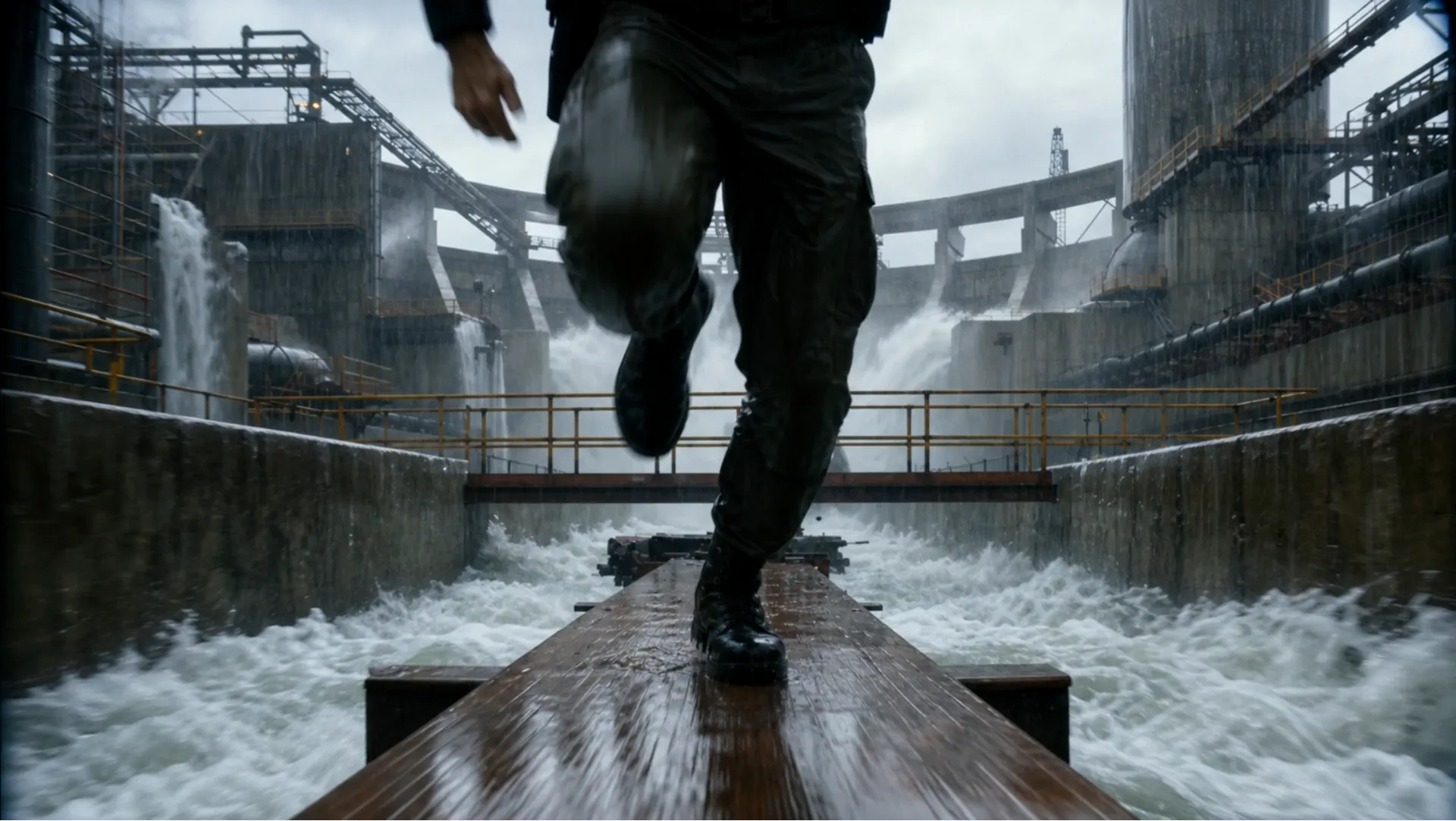
Ultra-realistic 16:9 cinematic creature-feature chase, 4K HDR, 35mm anamorphic, bright stormy daylight, heavy rain, rushing mist, wet concrete, practical giant-crocodile realism, aggressive handheld chase camera, low-angle tracking, whip pans, crash zooms, motion blur, speed ramps, bullet-time payoff. Scene: a massive flooded jungle water-treatment plant deep in rainforest: concrete channels, rusted catwalks, roaring spillways, floodgates, pumping stations, tropical storm chaos. 0-3s Hook: Begin mid-chase. A soaked jungle ranger in tactical gear sprints in panic across a narrow elevated walkway above a raging channel. Behind him, a gigantic crocodile explodes through a metal safety barrier; twisted rails fly into floodwater. The crocodile charges, throwing spray everywhere. Camera races backward in front of the ranger as he leaps broken walkway sections; his vest radio crackles static. 3-6s: He reaches a catwalk junction and jumps a gap, barely landing. The crocodile does not slow; it smashes through handrails and follows. Concrete chunks tumble into violent water below. The distance shrinks fast. 6-9s: The ranger reaches a dead-end platform at a giant floodgate control station. Nothing ahead. He turns as the crocodile advances, water dripping from its jaws. Camera pushes in on his terrified face, then snaps to a massive red emergency floodgate lever. 9-12s: The crocodile charges full speed. The ranger waits until the last possible second, then grabs the lever with both hands and yanks it down. Warning sirens blare. Huge machinery starts moving. 12-15s Payoff: The floodgate blasts open. Bullet time: a colossal wall of water erupts; crocodile eyes widen; rain, concrete fragments, and droplets hang in air. The torrent slams into the crocodile, launching it backward through concrete barriers into the roaring spillway. Time snaps back. A thunderous wave crashes through the facility. The ranger clings to the railing, watching the crocodile vanish into floodwaters.
Key Features of Kling 3.0 Turbo AI Video Model
Kling 3.0 Turbo combines text-to-video, first-frame image-to-video, short duration control, multi-shot prompting, and flexible aspect ratios for practical AI video generation.
Fast Text-to-Video Creation
Write a scene prompt with subject action, camera movement, style, atmosphere, and timing to generate short AI videos for ads, social content, storyboards, and concept testing.
First-Frame Image Animation
Use a supported first-frame image to guide the starting composition, then describe motion, camera direction, and visual changes for image-to-video generation.
Multi-Shot Story Control
Plan up to six shots with defined shot order, duration, and scene descriptions, giving creators more control over storyboard previews, product reveal clips, and short narrative pacing.
Advantages of Kling 3.0 Turbo AI Video Generator
From fast drafts to polished short-form clips, Kling 3.0 Turbo AI Video Generator offers a useful balance of speed, control, and format flexibility for modern AI video production.
Faster AI Video Iteration
Kling 3.0 Turbo helps creators test multiple video directions quickly, making it easier to compare hooks, visual styles, camera moves, and short-form story ideas.
Flexible Output for Social Formats
Supported 16:9, 9:16, and 1:1 aspect ratios make it easier to create clips for YouTube, TikTok, Instagram, product pages, presentations, and paid campaigns.
Structured Prompt Precision
Multi-shot scene planning helps reduce vague direction by separating each shot into its own duration and description, improving control over compact video narratives and short-form ad variations.
Practical Text and Image Workflows
Start from a prompt when exploring a new idea, or use a first-frame image when you need the generated motion to begin from a specific visual reference.
How to Use Kling 3.0 Turbo AI Video Generator
Step 1: Enter a Prompt or Upload a First-Frame Image
Describe the video scene in detail for text-to-video, or upload a supported first-frame image for image-to-video generation. Add camera direction, action, lighting, style, and timing cues.
Step 2: Choose Video Settings and Generate
Select supported settings such as 720p or 1080p resolution, 16:9, 9:16, or 1:1 aspect ratio, and a 3 to 15 second duration, then generate your Kling 3.0 Turbo video.
Step 3: Preview, Refine, and Export
Review the generated clip, refine the prompt or shot structure if needed, create variations, and export the best result for social media, campaigns, websites, or presentations.
Explore Kling 3.0 Turbo AI Video Creations on Twitter

First Look New Kling Update! Upgraded O3 There's also Fast versions Looks noticably better! Image to Video Use the uploaded image as the exact identity reference for the woman: confident playful expression, light skin, stylish modern look. Convert her into realistic


Kling 3.0 Turbo and O3 upgrades is now live on fal! Turbo: faster generation, lower costs, superior lip-sync, stable motion Omni: stronger prompt and reference consistency Up to 15s clips with full 4K generation with Omni Smarter storyboards and high quality multishot workflows

The Kling vs Seedance race is getting spicy. Kling will drop 3.0 Fast / Omni upgrade tomorrow. Kling😊: Here’s 3.0 Fast — faster, cheaper, better lip-sync. Seedance 😁: Cute. Here’s 2.0 Mini, cheaper and faster than Fast. Kling 🙄: Also Omni supports 15s and 4K in/out. Seedance


Comparing Seedance 2.0 vs. Kling 3.0 Turbo Which one wins your workflow? Dropping my full initial review in the comments soon!
Kling 3.0 Turbo and O3 upgrades is now live on fal! Turbo: faster generation, lower costs, superior lip-sync, stable motion Omni: stronger prompt and reference consistency Up to 15s clips with full 4K generation with Omni Smarter storyboards and high quality multishot workflows
FAQs about Kling 3.0 Turbo AI Video Generator
More Articles & News about Kling 3.0 Turbo AI
Start with Kling 3.0 Turbo AI Video Generator
Create Video Now