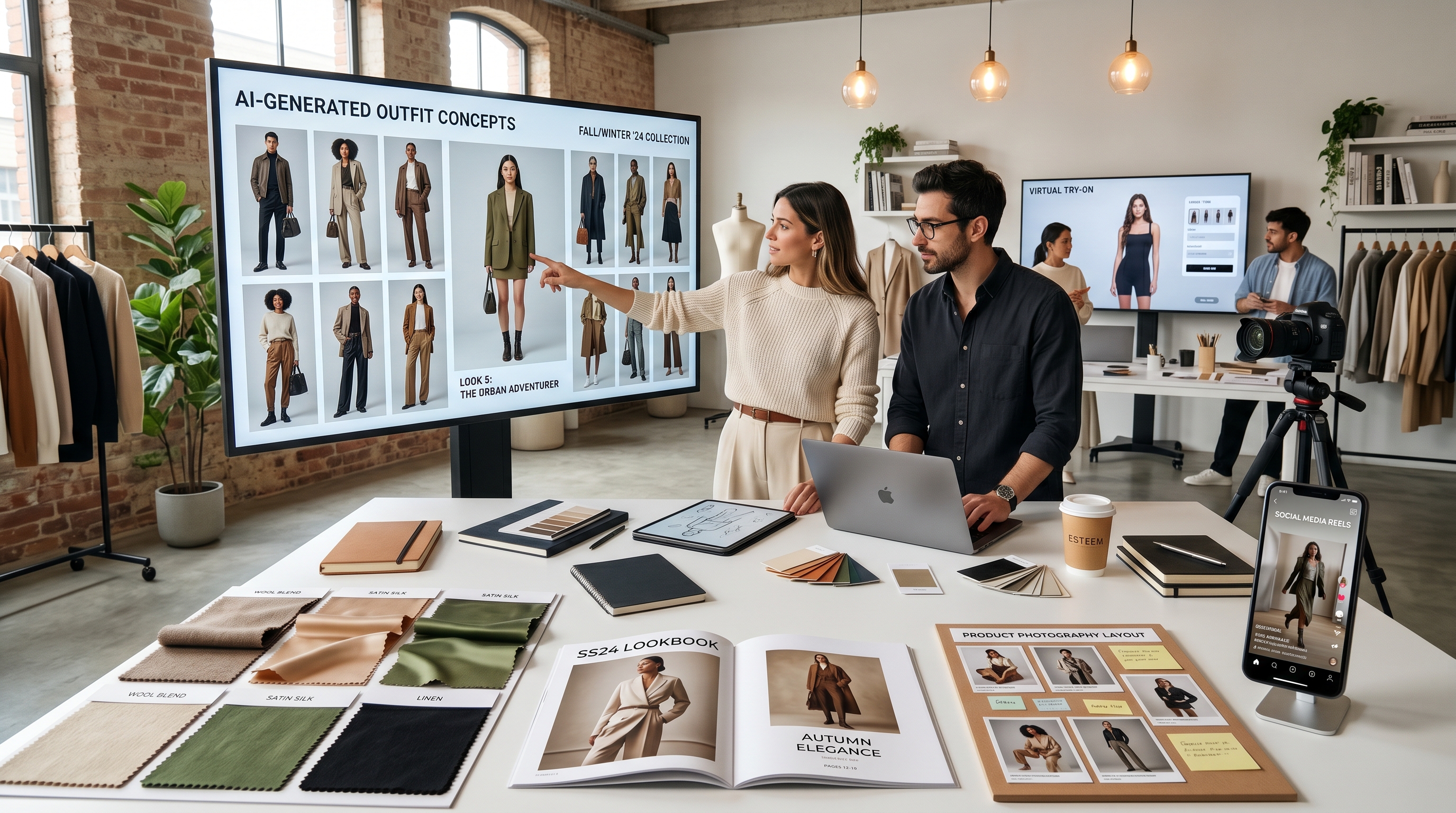
Fashion content moves fast. A seller may need a product banner today, a creator may need a lookbook concept by tomorrow, and a designer may want to test ten outfit directions before committing to one shoot. That is where ChatGPT Image 2 fashion workflows can become useful: not as a replacement for real garments, real models, or professional photography, but as a fast visual planning tool.
For fashion-commerce teams, GPT Image 2 can help turn vague ideas into clear visual directions. You can test an outfit concept, build a moodboard, design a catalog layout, draft product photo ideas, or plan a social campaign before spending money on a shoot. Then, when you need a more practical fitting or garment-preview workflow, tools such as AI fashion image generator features on TryOn AI can help move the concept closer to try-on, model styling, and fashion marketing use cases.
The best workflow is simple: use GPT Image 2 to imagine the visual direction, then use TryOn AI to test how clothing may look on models, in product images, or in short fashion videos.
Why GPT Image 2 Is Useful for Fashion Image Planning
Fashion planning is visual by nature. A phrase like “quiet luxury spring outfit” may sound clear in a meeting, but different people may imagine different fabrics, colors, cuts, and poses. GPT Image 2 helps make those ideas visible earlier in the process.
For designers, it can generate rough visual directions for silhouettes, fabric combinations, seasonal palettes, and editorial styling. For sellers, it can help create product photo concepts, ad banners, store visuals, and social media directions. For creators, it can quickly test whether an outfit idea looks better as a street-style shot, a clean studio portrait, or a cinematic short-video cover.
This is where fashion AI is most useful: it lowers the cost of visual experimentation. You do not need to finalize every garment or book every location before you understand what the campaign could look like. You can prompt, compare, revise, and build a clearer direction before moving into production.
A good starter prompt might be:
Create a spring resortwear outfit concept featuring a linen blazer, wide-leg cream trousers, woven sandals, warm sunlight, a clean coastal background, and editorial fashion photography.
That kind of prompt is not just asking for “nice clothes.” It gives the model garment type, fabric, color, environment, lighting, and visual purpose.
How to Prompt Outfit Concepts Without Losing Fabric, Fit, and Style Details
A weak fashion prompt usually focuses only on style: “make a trendy outfit” or “create a luxury dress.” A stronger prompt explains how the garment should behave on the body.
Use this structure:
Subject + garment type + fabric + fit + color + styling + pose + setting + lighting + final use.
For example:
Full-body studio fashion image of a young adult model wearing an oversized charcoal wool coat, ivory ribbed knit sweater, straight black trousers, and leather loafers. Relaxed standing pose, softbox lighting, neutral gray background, realistic fabric texture, accurate sleeve length, natural folds, e-commerce lookbook style.
This prompt works because it protects the important details. The coat is oversized, the sweater is ribbed, the trousers are straight, and the image has a clear commercial purpose. If you are using an AI outfit generator workflow later, these details also make it easier to maintain a consistent styling direction.
Fabric descriptions matter. Silk should drape softly and reflect light. Denim should look heavier, with structured folds and visible seams. Wool should feel thick and matte. Leather should show slight shine and joint creases. Chiffon should look light, translucent, and layered. Instead of only naming the fabric, describe how it moves, folds, shines, or holds shape.
You can also add correction lines to reduce common AI fashion errors:
Avoid distorted hands, unrealistic fabric physics, extra buttons, warped shoes, unreadable logo text, mismatched sleeve length, and over-smoothed fabric texture.
When the goal is a realistic preview rather than a concept illustration, it makes sense to move from image generation into an AI clothes try-on workflow, especially when you want to test how a garment appears on a person or replace clothing in an existing image.
Creating Lookbook Pages, Catalog Images, and E-Commerce Banners
GPT Image 2 can be especially helpful for planning fashion assets that require layout, mood, and visual hierarchy. A lookbook page is not just a model wearing clothes. It includes spacing, typography zones, color harmony, detail shots, and a sense of brand identity.
A lookbook prompt might be:
Luxury autumn capsule wardrobe lookbook page, four coordinated outfits shown in a clean editorial layout, warm beige and deep brown palette, elegant typography space, studio portraits mixed with close-up fabric texture shots, premium fashion magazine design.
For brands or boutiques, an AI lookbook generator workflow can help visualize collections before real photography begins. You can compare whether the same clothing line feels stronger in a minimalist studio setting, a city-street setting, or a lifestyle environment.
Product page images need a different approach. They should be clean, accurate, and easy to understand. Instead of over-stylizing the scene, focus on front view, back view, side view, fabric close-ups, stitching, hems, buttons, pockets, zippers, collar shape, and natural shadows.
A product prompt might be:
Minimal e-commerce product photo of a cream satin blouse on a clean mannequin, front view, natural fabric sheen, visible collar and cuff structure, soft studio lighting, white background, realistic product photography.
For sellers, AI product photography tools can also support product showcases and marketing clips once the still-image direction is clear.
E-commerce banners need another layer: space for text. If you forget to ask for empty space, the image may become too busy for a headline, button, or promotional message.
Example:
Wide website hero banner for a summer linen collection, two models walking in soft daylight, neutral sand background, empty space on the left for headline text, premium minimalist fashion brand style, realistic clothing folds.
For store owners, clear e-commerce fashion images can help connect styling, product display, and campaign visuals into one consistent brand direction.
From AI Concept Image to Virtual Try-On Workflow
A smart fashion AI workflow should separate imagination from verification. GPT Image 2 is useful for generating ideas, but a concept image should not automatically be treated as proof of fit, fabric accuracy, or real product appearance.
Start by using GPT Image 2 to create the outfit direction. Decide the garment type, fabric, color, model pose, mood, and environment. Then prepare cleaner reference material: a garment image with good lighting, minimal background clutter, and a clear front-facing view. Avoid reference images where the garment is hidden behind hands, bags, hair, or heavy shadows.
After that, move into virtual try-on AI to test outfit previews more directly. TryOn AI’s tools are especially relevant for creators, small fashion brands, and sellers who want to explore how clothing may appear on different models or in different styling situations.
For fast clothing replacement, the AI Clothes Changer can help test outfit swaps. For more model-focused visual planning, the AI Fashion Model Generator can support lookbook-style images. If you want to turn approved outfit images into motion content, the AI Outfit Video Generator is useful for short reels, product showcases, and social clips.
The key is to use each tool at the right stage. GPT Image 2 is strong for concepting. TryOn AI is stronger for try-on, outfit replacement, model presentation, and fashion-content production.
Prompt Tips for Designers, Sellers, and Content Creators
Fashion designers should prompt around silhouette and construction. Mention shoulder shape, waistline, hem length, sleeve volume, layering, fabric tension, and movement. For example:
Avant-garde black evening dress with sculptural shoulder structure, matte crepe fabric, asymmetrical hem, architectural silhouette, dramatic studio lighting, full-body editorial runway pose.
E-commerce sellers should prompt for clarity. A shopper needs to understand what the product looks like, not just admire a dramatic scene. Use plain backgrounds, accurate color, natural fabric, and visible product details.
Creators should prompt for personality and platform format. A TikTok cover may need vertical framing, movement, street energy, and stronger contrast. An Instagram carousel may need cleaner styling, consistent lighting, and multiple outfit variations.
If you already have a reference image but do not know how to describe it, an Image to Prompt tool can help turn visual references into reusable prompt language. This is helpful for teams that want to maintain a consistent mood across several fashion images.
Common Mistakes to Avoid
The first mistake is ignoring the pose. Clothing changes shape when a model walks, sits, twists, or raises an arm. If you need to show sleeve length, waistline, or garment structure, ask for a simple pose with the arms slightly away from the body.
The second mistake is mixing too many styles in one prompt. “Luxury editorial, cyberpunk, cottagecore, streetwear, vintage film, clean catalog style” may confuse the image direction. Choose one main style and one supporting mood.
The third mistake is forgetting product accuracy. For fashion-commerce images, details matter: buttons, seams, pockets, collar shape, zipper placement, material thickness, and garment length. A beautiful image is not enough if the clothing structure is wrong.
The fourth mistake is using concept art as final try-on proof. AI-generated fashion ideas are excellent for planning, but realistic try-on and garment preview should use dedicated tools such as FASHN Virtual Try On AI or Kolors Virtual Try On AI when the goal is to visualize clothing on a person.
Used carefully, GPT Image 2 and TryOn AI can support a practical fashion workflow: imagine the idea, refine the styling, test the garment, create product visuals, and turn the final direction into content that feels ready for modern fashion commerce.
Prompt Pack Add-On: 12 GPT Image 2 Fashion Prompts for Lookbooks, Product Pages, Seasonal Outfits, and Social Reels
1. Minimal Capsule Wardrobe Lookbook
Create a clean fashion lookbook page for a minimalist capsule wardrobe, featuring three full-body outfits in beige, ivory, black, and soft gray. Use simple studio backgrounds, elegant model poses, realistic fabric textures, magazine-style spacing, and empty areas for captions.
2. Luxury Product Page Image
Generate a high-end e-commerce product image of a tailored camel coat, front view on a model, soft studio lighting, neutral background, visible lapel structure, clean seams, natural wool texture, realistic fit, and no distracting accessories.
3. Streetwear Social Reel Cover
Create a vertical fashion reel cover image with an urban streetwear outfit: oversized hoodie, cargo pants, chunky sneakers, evening city lights, confident standing pose, cinematic flash photography, and bold creator-style styling.
4. Summer Resort Outfit Concept
Generate a full-body resortwear outfit concept with a linen shirt, wide-leg trousers, woven tote bag, sandals, coastal sunlight, relaxed walking pose, natural fabric wrinkles, and warm editorial photography.
5. Winter Coat Campaign Banner
Create a wide website banner for a winter outerwear collection, showing two models wearing long wool coats in a snowy city setting. Use soft cold lighting, luxury campaign styling, and empty space on the right for headline and call-to-action text.
6. Try-On Garment Reference Image
Generate a clean front-facing product image of a satin midi dress, sleeveless design, defined waist seam, smooth fabric sheen, neutral white background, realistic shadow, no model, no hanger, product catalog style.
7. Denim Product Detail Shot
Create a close-up product photo of a denim jacket sleeve and pocket, with visible stitching, metal buttons, textured blue denim, soft natural light, sharp detail, and realistic fabric weight.
8. Editorial Fashion Moodboard
Generate a fashion moodboard for a modern romantic collection, including soft pink silk, cream lace, pearl accessories, handwritten notes, fabric swatches, model portrait references, and elegant magazine art direction.
9. Office Outfit Lookbook Page
Create a professional officewear lookbook page with a blazer, silk blouse, straight trousers, loafers, clean studio setting, confident model poses, neutral tones, realistic fabric and fit, and premium catalog layout.
10. Athleisure Product Campaign
Generate an athleisure campaign image with a model wearing fitted performance leggings and a cropped zip jacket, clean gym studio background, dynamic stretching pose, realistic fabric compression, breathable texture, and modern sportswear branding.
11. Holiday Party Outfit Concept
Create a festive evening outfit concept with a velvet blazer, satin slip skirt, metallic heels, warm indoor lighting, elegant party background, realistic fabric highlights, and polished fashion editorial style.
12. Multi-Outfit Comparison Grid
Generate a four-panel outfit comparison grid showing one model styled in casual, office, evening, and weekend outfits. Keep the pose and lighting consistent, use a clean background, realistic clothing structure, and fashion styling guide layout.
Recommended TryOn AI Tools and Workflow
For the strongest fashion-commerce workflow, use GPT Image 2 for early concepting and TryOn AI for more practical garment, model, and fashion content production.
- AI Try On — for realistic outfit previews from reference images.
- AI Clothes Changer — for fast clothing swaps and outfit testing.
- AI Fashion Model Generator — for model-based fashion visuals, lookbooks, and product pages.
- Kolors Virtual Try On AI — for virtual try-on images with garment references.
- FASHN Virtual Try On AI — for fashion try-on image generation and product preview workflows.
- Magic Try On — for personal outfit previews and marketing images.
- AI Outfit Video Generator — for turning outfit images into short fashion videos.
- AI Product to Video — for product showcases and fashion marketing clips.
- Image to Prompt — for converting reference photos into reusable prompt descriptions.
Recommended Other Models and Tools
- GPT Image 2 on Flyne AI — useful for GPT Image 2-style fashion image generation and prompt testing.
- AI Image Generator on Flyne AI — useful for fashion posters, outfit concepts, and brand visuals.
- Image to Image AI on Flyne AI — useful for refining references, sketches, and fashion design prototypes.
- AI Clothes Changer Guide on Fylia AI — useful for outfit-swapping workflow ideas.
- Nano Banana Product Photo Guide on Fylia AI — useful for AI product photography and advertising visuals.
- SeaImagine AI Image Generator Guide — useful for beginner-friendly image generation workflows.
- HeyDream AI Image Generator Guide — useful for model selection and text-to-image workflows.
- DreamMachine AI Video Generator Guide — useful for turning fashion stills into video concepts.
- VideoWeb Nano Banana 2 Image Generator — useful for high-resolution image generation and editing workflows.
Related Article
- Explore AI Clothes Changer: Online Virtual Art by AI Try On
- How to Create AI Fashion Models and Kolors Virtual Try-On Images
- Best 10 Nano Banana Pro Prompt Guide for AI Try-On Image Generation
- Qwen Image Edit in Fashion: From AI Photo Modify to Virtual Try-On
- How to Use Veo 3.1 to Generate Stunning AI Try-On Videos
People Also Read
- AI Image Generator Guide: Best Models for Text-to-Image and Image-to-Image
- How to Use an AI Video Generator for Text and Image Workflows
- Nano Banana 2: Ultra-Fast 4K AI Images for Creative Workflows
- How to Use an AI Image Generator: A Beginner-Friendly Tutorial
- AI Clothes Changer Guide: How to Swap Outfits with Nano Banana 2
- GPT Image 2 Explained: What’s New and How It Compares With Nano Banana Pro