Why This AI Fashion Workflow Matters
Creating polished fashion visuals used to require a model, a studio, multiple garment samples, retouching time, and a healthy production budget. Now, a faster workflow is possible. By combining an AI fashion model generator with Kolors Virtual Try-On, brands, sellers, designers, and content creators can build clean product visuals without organizing a traditional photoshoot for every variation.
This approach is especially useful when you want to test different looks, show the same outfit on different model types, or prepare campaign assets quickly. Instead of treating model creation and outfit visualization as separate tasks, you can move from generated talent to finished try-on images in one connected pipeline.
What the AI Fashion Model Generator Does Well
The AI fashion model generator on AI TryOn is designed to create photorealistic fashion portraits that can be used for e-commerce, social content, lookbooks, and early campaign drafts. If you want to create AI fashion models without hiring talent for every concept, it gives you a fast starting point.
From the current interface, the workflow is straightforward. You can choose a model engine, enter a prompt, upload a reference image if needed, and pick from visual templates before generating. That makes the tool approachable for beginners, while still giving experienced users enough flexibility to guide pose, styling direction, and overall presentation.
In practical terms, this matters because good fashion content depends on more than just a pretty face. You need a model image that feels commercially usable: clean composition, believable proportions, strong clothing presentation, and a background that does not compete with the product.
How to Use the AI Fashion Model Generator
Start by opening the AI fashion model generator and deciding what kind of output you need. Are you creating a studio-style catalog image, a lifestyle campaign visual, or a simple base model for later try-on work? Your prompt should answer that clearly.
A strong prompt usually includes five elements: subject, age range or overall vibe, outfit category, pose, and setting. For example, instead of writing “fashion model,” write something more specific such as “young female fashion model in a clean studio, front-facing pose, neutral expression, soft lighting, e-commerce style.” If you need sharper consistency, upload a reference image or start from one of the built-in templates shown in the generator.
The layout also makes iteration easy. You can test multiple prompt directions, compare templates, and refine the result before moving to garment replacement. This is one of the real strengths of using AI fashion models in a modern workflow: you can decide on the person, framing, and mood first, then handle outfit presentation in the next step.
What Kolors Virtual Try-On Is Best For
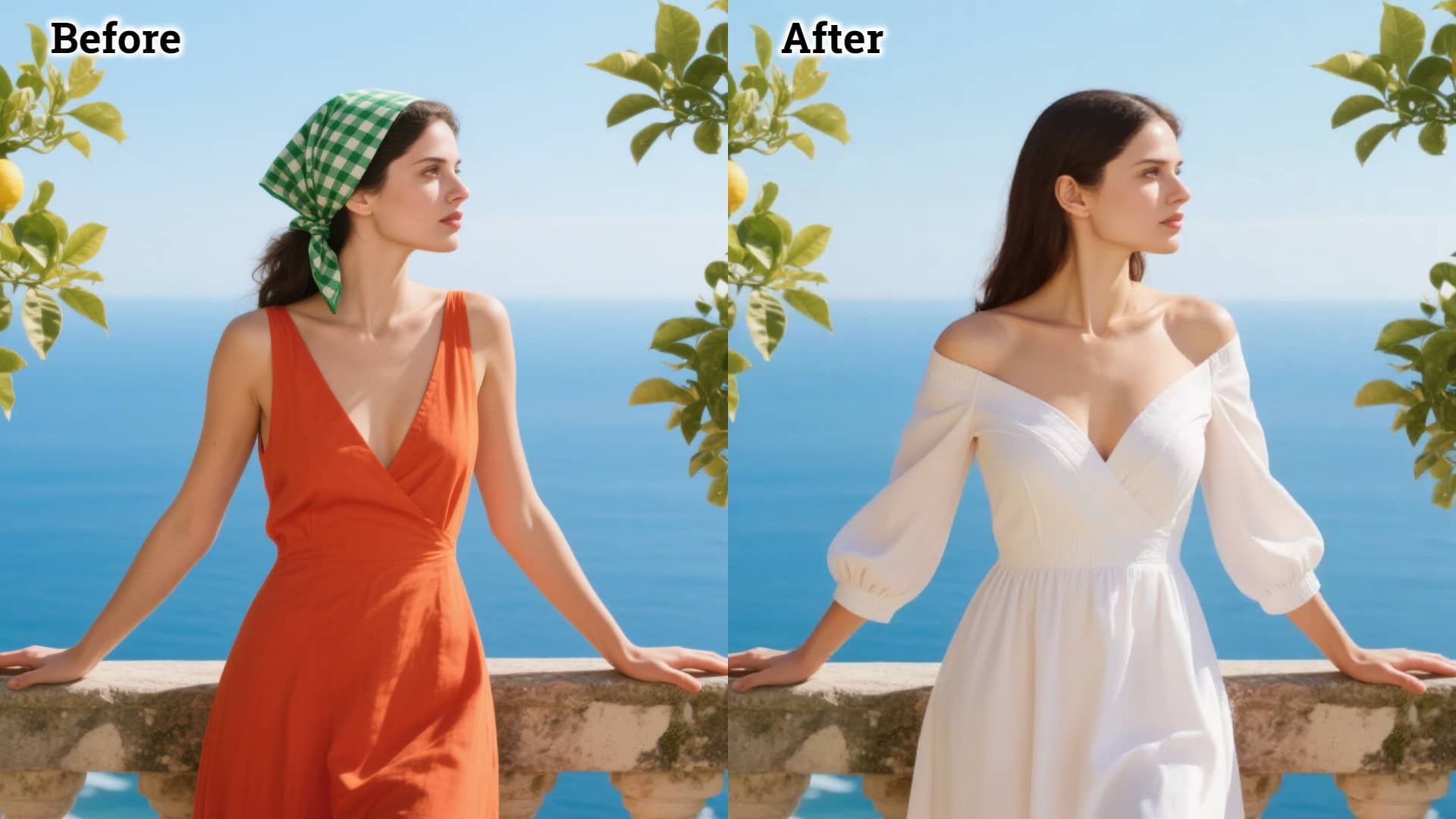
Once you have your model image, the next step is Kolors Virtual Try-On. This tool is built for digitally dressing a person image with a garment image, so you can preview how clothing may look without reshooting the model.
The current interface is clear. You first upload a person image or select from a person template. Then you upload clothing, choose between single-garment and multiple-garment options, and submit the job. Because the page is centered on separate person and clothing inputs, it is much easier to understand than many virtual fitting tools that bury the workflow behind too many settings.
For users who are specifically looking for a Kolors virtual try-on AI workflow, that simplicity is a major benefit. You do not have to overthink the setup. You just need a clean person image, a clear clothing image, and realistic expectations about how detailed or complex the garment is.
How to Use Kolors Virtual Try-On More Effectively
The quality of your result depends heavily on your inputs. When using Kolors Virtual Try-On, pick a person image with a visible body shape, natural pose, and lighting that matches the garment image as closely as possible. Avoid cluttered backgrounds, cropped limbs, or dramatic angles unless you are intentionally going for a stylized result.
For the clothing image, use a clear item photo with visible edges and minimal overlap. Product shots on plain backgrounds usually work best. If the outfit includes many layers, accessories, or highly reflective fabrics, expect to run a few extra generations to get the most believable result.
One useful detail in Kolors Virtual is the ability to work from templates on both the person side and the clothing side. That makes it easier to test the tool even before you prepare your full production assets. It is a good way to understand what kinds of poses and garment photos generate cleaner try-on images.
The Best End-to-End Workflow: From Model Creation to Virtual Styling
The most efficient workflow is to treat both tools as part of one production system.
First, create a base model in the AI fashion model generator. Keep the pose simple and the body visible enough for clothing transfer. Second, export the model image and prepare your garment shot. Third, upload both into Kolors virtual try-on. Fourth, review the fit, silhouette, and fabric behavior. If the result looks slightly off, do not immediately blame the model; often the issue comes from the clothing source image, cropping, or mismatched perspective.
This two-stage method is more flexible than generating everything in one step because it lets you separate identity creation from outfit testing. You can build one model and reuse that person across multiple garments, campaigns, or seasonal collections. That is where AI fashion models become especially useful for e-commerce teams and fast-moving creative departments.
Practical Tips for Cleaner Results
To get better outputs, keep your first runs simple. Use front-facing or slightly angled poses. Choose tops, dresses, jackets, or pants with clear outlines. Avoid heavy motion, crossed arms, or hands covering key garment areas. Once you get a stable result, then test more ambitious looks.
It also helps to think in layers. Use the AI fashion model generator to lock in the person and mood. Use Kolors virtual try-on AI to test the garment. Then refine the final image for publishing if needed. This structure saves time because each tool is doing the part it handles best.
Another useful habit is to generate several base models rather than only one. A small set of reusable AI fashion models can cover different demographics, brand moods, and outfit categories. Once you have that library, your try-on workflow becomes much faster.
Who Should Use This Workflow
This setup is helpful for fashion brands, online stores, boutique sellers, digital stylists, and social media teams. It is also useful for independent designers who need presentation-ready images before manufacturing every sample. If your job involves testing product visuals quickly, a combination of AI fashion model generator output and Kolors virtual try-on can significantly reduce production friction.
For marketing teams, the value is speed. For design teams, the value is experimentation. For sellers, the value is better product presentation. And for creators, the value is simply having more room to test ideas before committing to a final direction.
Final Thoughts
Used together, the AI fashion model generator and Kolors Virtual Try-On create a practical fashion-content workflow from concept to publishable image. One tool helps you build the person. The other helps you dress that person efficiently. That combination makes it easier to produce catalog visuals, campaign drafts, and social assets at a much lower cost than traditional production.
If your goal is to make fashion content faster without making it feel disposable, this is a strong workflow to learn. Start with a clean base model, use organized garment images, iterate a few times, and build your own repeatable visual system from there.
More Tools to Explore
If you want to extend this workflow, these tools on the same platform pair naturally with model creation and virtual styling:
- AI Clothes Changer for quick outfit swaps from a photo.
- AI Outfit Video Generator for turning static fashion visuals into motion content.
- Free AI Background Remover for cleaning person or garment images before generation.
- Image to Prompt for extracting usable prompt language from a reference image.
- FASHN Virtual Try On AI for another try-on workflow when you want to compare results.
Related Article
- How to Use AITryOn’s Free AI Background Remover for Cleaner Images and Faster Creative Workflows
- How to Turn Any Reference Image Into Better AI Prompts With AITryOn
- Bring Fashion to Life: How to Transform Fashion Image into Video with Try On AI
- Qwen Image Edit in Fashion: From AI Photo Modify to Virtual Try-On
People Also Read
- HeyDream AI Image Generator Guide: Best Models for Text-to-Image and Image-to-Image
- How to Use DreamMachine AI’s AI Video Generator: A Practical Guide for Text and Image Workflows
- Nano Banana 2: Ultra-Fast 4K AI Image Model for Creators
- How to Use Sea Imagine AI’s Image Generator: A Beginner-Friendly Tutorial